RET9

GAME: Counter-Strike 2
ON UPDATE
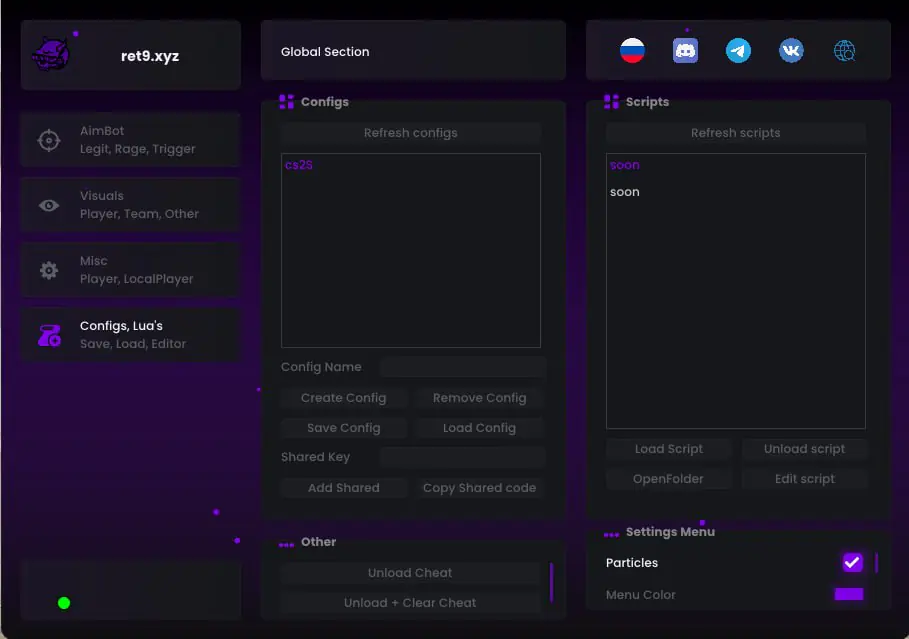
RET9 — Counter-Strike 2 screenshot 1
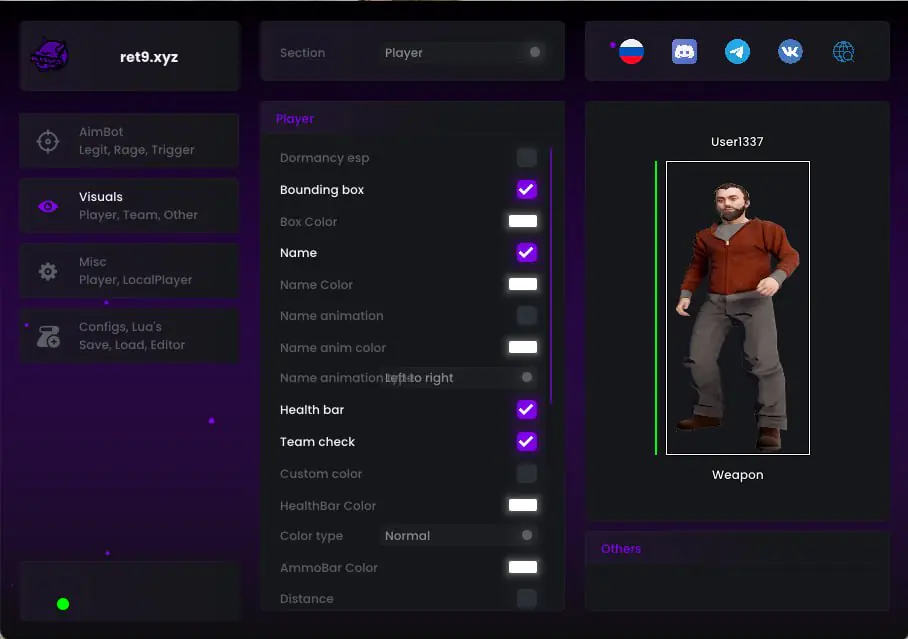
RET9 — Counter-Strike 2 screenshot 2
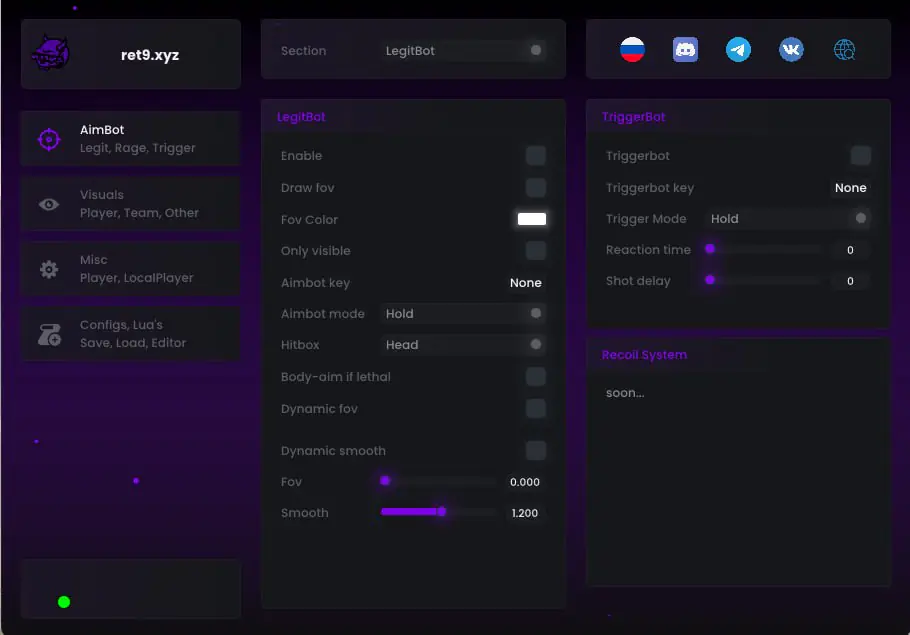
RET9 — Counter-Strike 2 screenshot 3

DESCRIPTION

RET9 — Counter-Strike 2 Product Feature List

1. AimBot (Legit, Rage, Trigger)
- LegitBot Section:
* Enable (Enable aiming)
* Draw fov (Display the aiming radius)
* Fov Color (FOV circle colour)
* Only visible (Target visibility check)
* Aimbot key (Aiming activation key)
* Aimbot mode (Hold / Toggle)
* Hitbox (Select a target bone: Head, Neck, Chest and others)
* Body-aim if lethal (Automatically aim at the body when the target has low HP)
* Dynamic fov (Dynamic FOV)
* Dynamic smooth (Dynamic smoothing)
* Fov slider (Adjust the aiming radius)
* Smooth slider (Adjust aiming smoothness)

2. TriggerBot & Recoil System
- TriggerBot Section:
* Triggerbot (Enable automatic firing)
* Triggerbot key (Trigger activation key)
* Trigger Mode (Hold / Toggle)
* Reaction time (Delay before firing)
* Shot delay (Delay between shots)
- Recoil System (Recoil control system):
* In development (Soon...)

3. Visuals (Player, Team, Other)
- Player Section:
* Dormancy esp (Display players even when the server has not recently updated them)
* Bounding box (Draw boxes around opponents)
* Box Color (Choose box colours)
* Name (Display player names)
* Name Color (Choose name colours)
* Name animation (Name appearance and movement animation)
* Name anim color (Name animation colour)
* Name animation direction (Left to right and other directions)
* Health bar (Opponent health bar)
* Team check (Filter visual features for teammates)
* Custom color (Custom colour palette)
* HealthBar Color (Health bar colour)
* Color type (Colour type: Normal and others)
* AmmoBar Color (Ammunition bar colour)
* Distance (Show player distance)

4. Misc (Player, LocalPlayer)
- Various utility features for the player and local character.

5. Configs, Lua's (Save, Load, Editor)
- Global Section:
* Configs Area (Configuration management):
- Configuration list (for example, cs2S)
- Refresh configs (Refresh the configuration list)
- Config Name field (Enter a configuration name)
- Create Config (Create a new configuration)
- Remove Config (Delete the selected configuration)
- Save Config (Save the current settings to a configuration)
- Load Config (Load the selected configuration)
- Shared Key field (Enter a sharing key)
- Add Shared (Add a configuration using its sharing code)
- Copy Shared code (Copy the sharing code for the current configuration)
* Scripts Area (Lua script management):
- Refresh scripts (Refresh the script list)
- Script list (In development / Soon...)
- Load Script (Load the selected script)
- Unload script (Unload the script)
- OpenFolder (Open the scripts folder)
- Edit script (Edit a script in the built-in editor)
* Other Section:
- Unload Cheat (Unload the product from the game)
- Unload + Clear Cheat (Unload and clear the product's traces, according to the source description)
* Settings Menu:
- Particles (Enable or disable menu visual effects and particles)
- Menu Color (Choose the main interface colour)

FEATURES

RET9 — Counter-Strike 2 Product Feature List1. AimBot (Legit, Rage, Trigger)- LegitBot Section:* Enable (Enable aiming)* Draw fov (Display the aiming radius)* Fov Color (FOV circle colour)* Only visible (Target visibility check)* Aimbot key (Aiming activation key)* Aimbot mode (Hold / Toggle)* Hitbox (Select a target bone: Head, Neck, Chest and others)* Body-aim if lethal (Automatically aim at the body when the target has low HP)* Dynamic fov (Dynamic FOV)* Dynamic smooth (Dynamic smoothing)* Fov slider (Adjust the aiming radius)* Smooth slider (Adjust aiming smoothness)2. TriggerBot & Recoil System- TriggerBot Section:* Triggerbot (Enable automatic firing)* Triggerbot key (Trigger activation key)* Trigger Mode (Hold / Toggle)* Reaction time (Delay before firing)* Shot delay (Delay between shots)- Recoil System (Recoil control system):* In development (Soon...)3. Visuals (Player, Team, Other)- Player Section:* Dormancy esp (Display players even when the server has not recently updated them)* Bounding box (Draw boxes around opponents)* Box Color (Choose box colours)* Name (Display player names)* Name Color (Choose name colours)* Name animation (Name appearance and movement animation)* Name anim color (Name animation colour)* Name animation direction (Left to right and other directions)* Health bar (Opponent health bar)* Team check (Filter visual features for teammates)* Custom color (Custom colour palette)* HealthBar Color (Health bar colour)* Color type (Colour type: Normal and others)* AmmoBar Color (Ammunition bar colour)* Distance (Show player distance)4. Misc (Player, LocalPlayer)- Various utility features for the player and local character.5. Configs, Lua's (Save, Load, Editor)- Global Section:* Configs Area (Configuration management):- Configuration list (for example, cs2S)- Refresh configs (Refresh the configuration list)- Config Name field (Enter a configuration name)- Create Config (Create a new configuration)- Remove Config (Delete the selected configuration)- Save Config (Save the current settings to a configuration)- Load Config (Load the selected configuration)- Shared Key field (Enter a sharing key)- Add Shared (Add a configuration using its sharing code)- Copy Shared code (Copy the sharing code for the current configuration)* Scripts Area (Lua script management):- Refresh scripts (Refresh the script list)- Script list (In development / Soon...)- Load Script (Load the selected script)- Unload script (Unload the script)- OpenFolder (Open the scripts folder)- Edit script (Edit a script in the built-in editor)* Other Section:- Unload Cheat (Unload the product from the game)- Unload + Clear Cheat (Unload and clear the product's traces, according to the source description)* Settings Menu:- Particles (Enable or disable menu visual effects and particles)- Menu Color (Choose the main interface colour)

SYSTEM REQUIREMENTS

The supplier has not specified exact system requirements.
Before purchasing, confirm your Windows version, game version and launch-method compatibility with support.

CHECKOUT

7 Days$2.30
15 Days$3.80
30 Days$4.96
7777 Days$16.99
TOTAL
$2.30

PAYMENT

Please enter a valid email address

You must agree to the policy to proceed

Creating payment...