EXLAB-EFT
DESCRIPTION
Aimbot
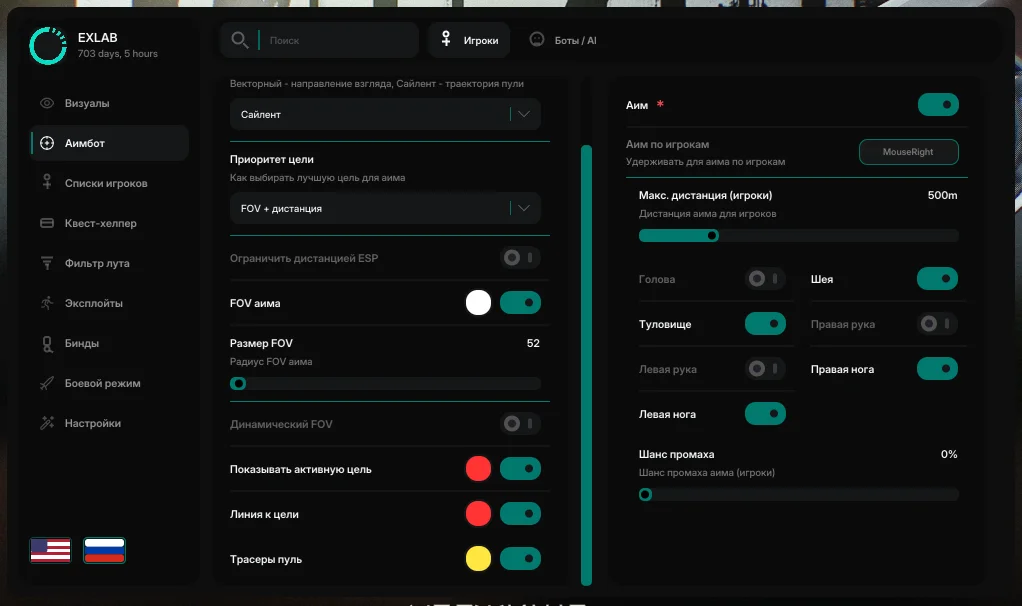
General aimbot settings
Always enabled — aim without holding the activation key
Aim mode — Vector: aim in the camera direction; Silent: bullet trajectory
Smoothness — Aiming speed in Vector mode
Target lock — Keep the current target while firing (Vector)
Target priority — FOV + distance / FOV only / distance only
ESP distance limit — aim only within the player/bot ESP rendering range
Aim FOV — acquisition circle while Aimbot is enabled
FOV size — Circle radius
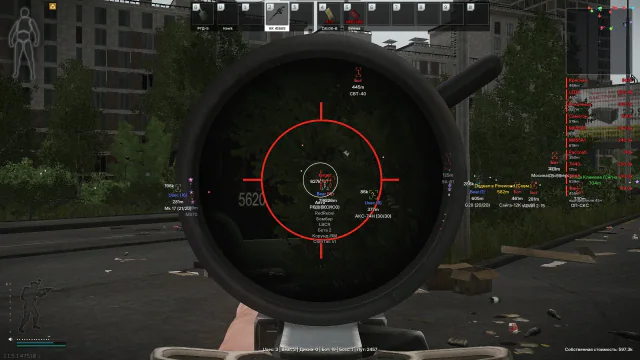
Dynamic FOV — scale the circle and target acquisition with scope zoom
Active target — mark the current target above the ESP labels
Target line — line from the crosshair to the targeted bone
Bullet tracers — Traces of fired bullets
Aimbot for players/bots
Aim — enable aiming at players/bots
Key binding: Aim at players — hold to activate
Maximum distance — 1–2000 m
Bones: Head, Neck, Torso, Left arm, Right arm, Left leg, Right leg
Miss chance — Silent only: skip aiming for a bullet
Visuals
Players
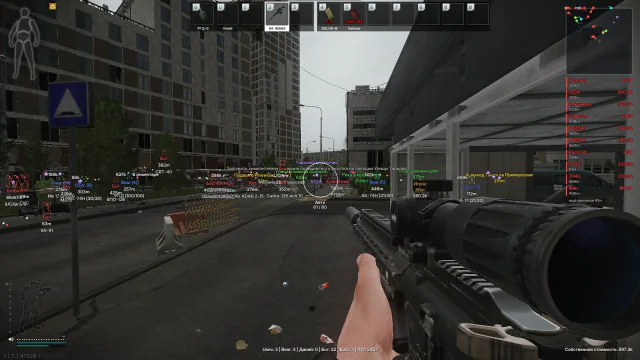
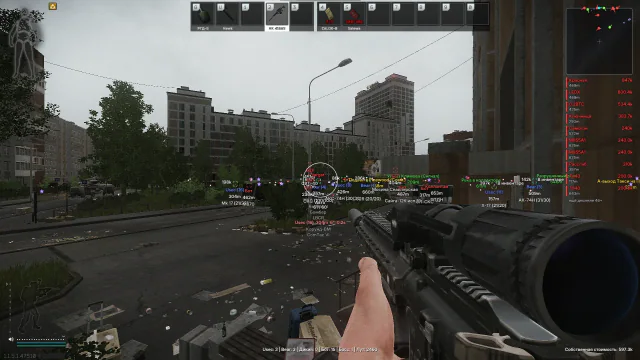
Draw players — Main player ESP toggle
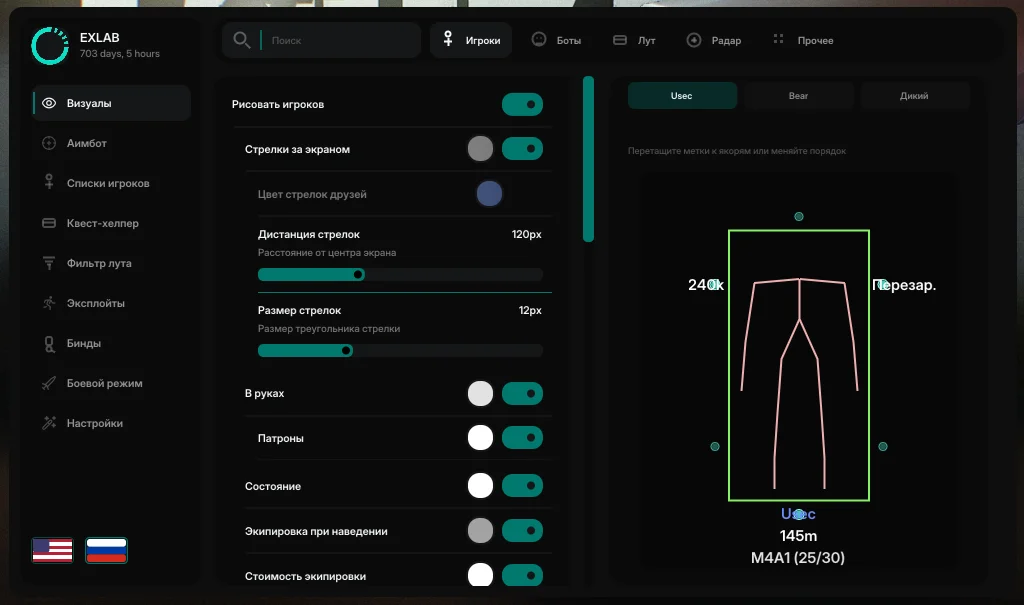
Off-screen arrows — Indicators for players outside the screen
Friend arrow colour — Separate colour for friends
Arrow distance — distance from the screen centre
Arrow size — Triangle size
In hands — held item
Ammunition — Magazine counter next to "In hands"
State — Reloading / Aiming / In inventory
Equipment on hover — Player equipment
Equipment value — Total equipment value
Faction — USEC / BEAR / SCAV label
Distance — distance to a player
Skeleton — Draw player skeletons
Box — draw a player box
Player preview — Position labels on the silhouette
Bots
Draw bots — Main bot ESP toggle
In hands — item held by a bot
Ammunition — Bot magazine counter
Equipment on hover — Bot equipment on hover
Equipment value — Total bot equipment value
Faction — Bot / boss / raider label, etc.
Distance — distance to a bot
Skeleton — Draw bot skeletons
Box — draw a bot box
Bot preview — Position labels on the silhouette
Radar
Enable radar — display a radar minimap on screen
Position — Screen corner: top left / top right / bottom left / bottom right
X offset — Horizontal offset from the edge
Y offset — Vertical offset from the edge
Radar size — Radius in pixels
Square shape — square instead of a circle
Rotate with camera — rotate according to viewing direction
Show background — Draw the radar background
Viewing direction — direction lines on radar
Radar range — 50–2000 m
Maximum target distance — 50–2000 m
Show distance — Distance beside labels
Show metres — Add the "m" suffix to distances
Show: USEC, BEAR, SCAV, Friends, Raider, Black Division, Boss, Cultist, Bot, BTR
Dead players — corpses on radar
Loot
Draw loot — ESP for items on the ground
On hover — Names on hover, with grouping
Valuable loot list — top-priced items below the radar area in the upper-right corner
Loot distance — 50–2000 m
Loot-filter distance — 50–2000 m
Loot name — full or short name
Price source — flea market + traders / traders only / flea market only
Minimum price — hide items below this price
Show unpriced items — Include loot without a price when the minimum-price filter is active
Show price — Price in the ESP label
Default colour — Colour for ordinary loot
Price-based colours — Price gradient (From–To / Min–Max price range)
Key binding: Show all loot — ignore the On Hover condition
Other
Crosshair — Dot at the centre of the screen
Weapon fire mode — Below the crosshair (single / automatic, etc.)
Weapon ammunition — Counter below the crosshair
Looking at you — List of players looking at you
"Looking at you" angle — Detection cone, 5–20 degrees
World information — faction, bot, boss and loot counters
Own equipment value — Total value of the local player's equipment and inventory
Corpse — Show corpses on ESP (Players / Bots)
Corpse distance — 10–2000 m
Corpse equipment on hover — List shown when aiming at a corpse
Corpse value — Total contents value (minimum corpse value)
Container — crates, safes and other containers
Container distance — 10–2000 m
Exits — exit points on ESP
Grenades — grenade ESP
Grenade distance — 10–2000 m
Grenade warning — Prominent warning when a grenade is nearby
Show zones — Snipers, Mines, Minefields
APC — display the armoured personnel carrier on ESP
APC distance — 50–2000 m
APC route — named stops along the route
Quest helper
Quest settings
Zone names — quest name next to the zone marker
Zone descriptions — Objective text beside the marker
On hover — Zone labels appear only on hover
Zone distance — metres in the zone label
Zone outlines on radar — polygons when radar is enabled
Maximum zone distance — 50–2000 m
Show zones: Kills, Search, Visit, Placement, Other
Kappa only — Only quests required for Kappa
Show optional — Optional objectives in the list and zones
Selected only — Zone and item ESP only for the pinned quest
Quest item highlighting — Highlight quest loot on ESP
Quest item distance — stars at distances up to 2000 m
Quest loot on players — highlight loot in living players' equipment
Quest loot in player corpses — highlight loot in player corpses
Quest loot on bots — highlight loot in bot equipment
Quest loot in bot corpses — highlight loot in bot corpses
Active quests
Active quest list — Grouped by trader
Search — By name, ID, trader, map or objective text
Quest card — name, map and objectives list
Optional objectives — Marked with "(opt)"
Kappa — quests for Kappa are marked with an asterisk (*)
Current map — Quests on this map are outlined
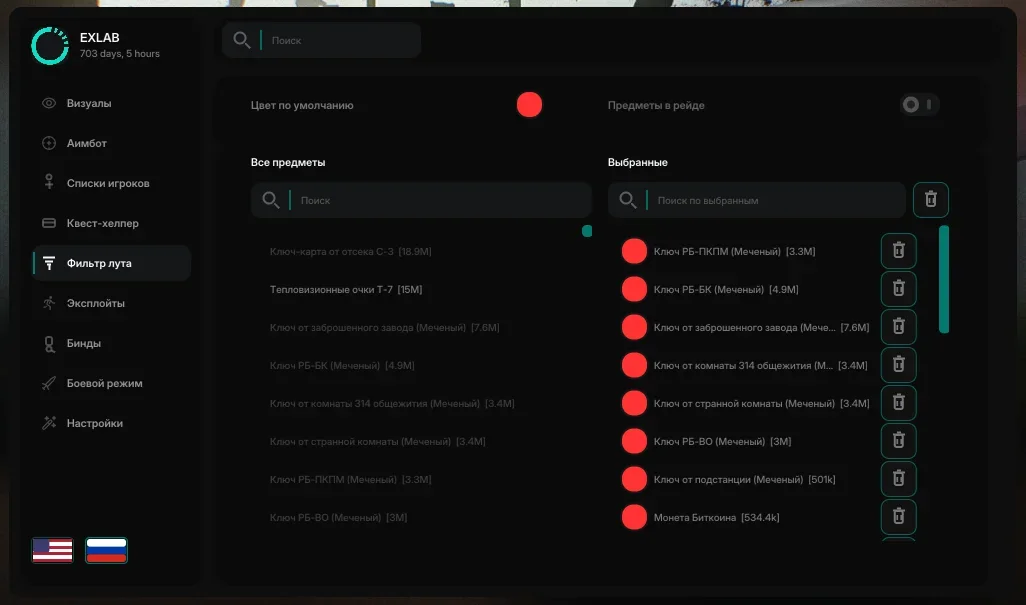
Loot filter
Default colour — Colour for items added to the filter
Items in raid — Catalogue contains only items spawned in the current raid
All items
Search — Filter the catalogue by name
Click an item — add it to or remove it from the filter
Selected items
Filter list — Added items with search
Colour — Individual colour for each item
Remove — Remove an item from the filter
Remove all — Clear the entire filter list
Player lists
Key binding: Add friend — add the target in the FOV or the selected player
Add Friend FOV — draw a FOV circle for adding a friend
Friend FOV radius
All players
List — Type (USEC / BEAR / SCAV / bot / boss, etc.) and distance
Add friend — button to add a player to the friends list
Friends
List — Added friends in the raid
Remove friend — Remove from the friends list
Exploits
No recoil — remove weapon recoil
No breathing — remove breathing sway
No hand inertia — remove walking sway and weapon inertia
No aim punch — remove shake from hits and landing
No weapon collision — prevent the weapon from colliding with walls
Instant ADS — skip the aiming animation
No malfunctions — disable jams and misfires
Always automatic — force automatic firing mode
FOV Changer — override the field of view
Zoom Hack — zoom the FOV in or out using a key binding
Free look — Unlimited head rotation
Thermal vision — Enable thermal vision
NVG — Night vision
No visor — disable the helmet visor effect
No flash — disable blinding from grenades/shots
Time of day — change in-game time
Sky colour — Change the sky colour
Weather — Adjust rain, fog, clouds and wind
Settings
Save configuration — Store settings
Load configuration — restore settings
Copy to clipboard — copy the configuration to the clipboard
Paste from clipboard — paste a configuration from the clipboard
Reset to defaults — Factory settings
Refresh item prices — Update prices without restarting the software or game
Unload — fully unload from the process
FEATURES
Aimbot
General aimbot settings
- Always enabled — aim without holding the activation key
- Aim mode — Vector: aim in the camera direction; Silent: bullet trajectory
- Smoothness — Aiming speed in Vector mode
- Target lock — Keep the current target while firing (Vector)
- Target priority — FOV + distance / FOV only / distance only
- ESP distance limit — aim only within the player/bot ESP rendering range
- Aim FOV — acquisition circle while Aimbot is enabled
- FOV size — Circle radius
- Dynamic FOV — scale the circle and target acquisition with scope zoom
- Active target — mark the current target above the ESP labels
- Target line — line from the crosshair to the targeted bone
- Bullet tracers — Traces of fired bullets
Aimbot for players/bots
- Aim — enable aiming at players/bots
- Key binding: Aim at players — hold to activate
- Maximum distance — 1–2000 m
- Bones: Head, Neck, Torso, Left arm, Right arm, Left leg, Right leg
- Miss chance — Silent only: skip aiming for a bullet
Visuals
Players
- Draw players — Main player ESP toggle
- Off-screen arrows — Indicators for players outside the screen
- Friend arrow colour — Separate colour for friends
- Arrow distance — distance from the screen centre
- Arrow size — Triangle size
- In hands — held item
- Ammunition — Magazine counter next to "In hands"
- State — Reloading / Aiming / In inventory
- Equipment on hover — Player equipment
- Equipment value — Total equipment value
- Faction — USEC / BEAR / SCAV label
- Distance — distance to a player
- Skeleton — Draw player skeletons
- Box — draw a player box
- Player preview — Position labels on the silhouette
Bots
- Draw bots — Main bot ESP toggle
- In hands — item held by a bot
- Ammunition — Bot magazine counter
- Equipment on hover — Bot equipment on hover
- Equipment value — Total bot equipment value
- Faction — Bot / boss / raider label, etc.
- Distance — distance to a bot
- Skeleton — Draw bot skeletons
- Box — draw a bot box
- Bot preview — Position labels on the silhouette
Radar
- Enable radar — display a radar minimap on screen
- Position — Screen corner: top left / top right / bottom left / bottom right
- X offset — Horizontal offset from the edge
- Y offset — Vertical offset from the edge
- Radar size — Radius in pixels
- Square shape — square instead of a circle
- Rotate with camera — rotate according to viewing direction
- Show background — Draw the radar background
- Viewing direction — direction lines on radar
- Radar range — 50–2000 m
- Maximum target distance — 50–2000 m
- Show distance — Distance beside labels
- Show metres — Add the "m" suffix to distances
- Show: USEC, BEAR, SCAV, Friends, Raider, Black Division, Boss, Cultist, Bot, BTR
- Dead players — corpses on radar
Loot
- Draw loot — ESP for items on the ground
- On hover — Names on hover, with grouping
- Valuable loot list — top-priced items below the radar area in the upper-right corner
- Loot distance — 50–2000 m
- Loot-filter distance — 50–2000 m
- Loot name — full or short name
- Price source — flea market + traders / traders only / flea market only
- Minimum price — hide items below this price
- Show unpriced items — Include loot without a price when the minimum-price filter is active
- Show price — Price in the ESP label
- Default colour — Colour for ordinary loot
- Price-based colours — Price gradient (From–To / Min–Max price range)
- Key binding: Show all loot — ignore the On Hover condition
Other
- Crosshair — Dot at the centre of the screen
- Weapon fire mode — Below the crosshair (single / automatic, etc.)
- Weapon ammunition — Counter below the crosshair
- Looking at you — List of players looking at you
- "Looking at you" angle — Detection cone, 5–20 degrees
- World information — faction, bot, boss and loot counters
- Own equipment value — Total value of the local player's equipment and inventory
- Corpse — Show corpses on ESP (Players / Bots)
- Corpse distance — 10–2000 m
- Corpse equipment on hover — List shown when aiming at a corpse
- Corpse value — Total contents value (minimum corpse value)
- Container — crates, safes and other containers
- Container distance — 10–2000 m
- Exits — exit points on ESP
- Grenades — grenade ESP
- Grenade distance — 10–2000 m
- Grenade warning — Prominent warning when a grenade is nearby
- Show zones — Snipers, Mines, Minefields
- APC — display the armoured personnel carrier on ESP
- APC distance — 50–2000 m
- APC route — named stops along the route
Quest helper
Quest settings
- Zone names — quest name next to the zone marker
- Zone descriptions — Objective text beside the marker
- On hover — Zone labels appear only on hover
- Zone distance — metres in the zone label
- Zone outlines on radar — polygons when radar is enabled
- Maximum zone distance — 50–2000 m
- Show zones: Kills, Search, Visit, Placement, Other
- Kappa only — Only quests required for Kappa
- Show optional — Optional objectives in the list and zones
- Selected only — Zone and item ESP only for the pinned quest
- Quest item highlighting — Highlight quest loot on ESP
- Quest item distance — stars at distances up to 2000 m
- Quest loot on players — highlight loot in living players' equipment
- Quest loot in player corpses — highlight loot in player corpses
- Quest loot on bots — highlight loot in bot equipment
- Quest loot in bot corpses — highlight loot in bot corpses
Active quests
- Active quest list — Grouped by trader
- Search — By name, ID, trader, map or objective text
- Quest card — name, map and objectives list
- Optional objectives — Marked with "(opt)"
- Kappa — quests for Kappa are marked with an asterisk (*)
- Current map — Quests on this map are outlined
Loot filter
- Default colour — Colour for items added to the filter
- Items in raid — Catalogue contains only items spawned in the current raid
All items
- Search — Filter the catalogue by name
- Click an item — add it to or remove it from the filter
Selected items
- Filter list — Added items with search
- Colour — Individual colour for each item
- Remove — Remove an item from the filter
- Remove all — Clear the entire filter list
Player lists
- Key binding: Add friend — add the target in the FOV or the selected player
- Add Friend FOV — draw a FOV circle for adding a friend
- Friend FOV radius
All players
- List — Type (USEC / BEAR / SCAV / bot / boss, etc.) and distance
- Add friend — button to add a player to the friends list
Friends
- List — Added friends in the raid
- Remove friend — Remove from the friends list
Exploits
- No recoil — remove weapon recoil
- No breathing — remove breathing sway
- No hand inertia — remove walking sway and weapon inertia
- No aim punch — remove shake from hits and landing
- No weapon collision — prevent the weapon from colliding with walls
- Instant ADS — skip the aiming animation
- No malfunctions — disable jams and misfires
- Always automatic — force automatic firing mode
- FOV Changer — override the field of view
- Zoom Hack — zoom the FOV in or out using a key binding
- Free look — Unlimited head rotation
- Thermal vision — Enable thermal vision
- NVG — Night vision
- No visor — disable the helmet visor effect
- No flash — disable blinding from grenades/shots
- Time of day — change in-game time
- Sky colour — Change the sky colour
- Weather — Adjust rain, fog, clouds and wind
Settings
- Save configuration — Store settings
- Load configuration — restore settings
- Copy to clipboard — copy the configuration to the clipboard
- Paste from clipboard — paste a configuration from the clipboard
- Reset to defaults — Factory settings
- Refresh item prices — Update prices without restarting the software or game
- Unload — fully unload from the process
SYSTEM REQUIREMENTS
OS: Windows 10 / 11.
Game mode: windowed.
Game client: BSG / Steam.
Included spoofer: yes.