MASON Internal
GAME: Rust
UNDETECTED
ОПИСАНИЕ
MASON Internal для Rust: характеристики, системные требования и доступные сроки подписки. Перед покупкой проверьте ограничения и выбранный тариф.
ФУНКЦИИ
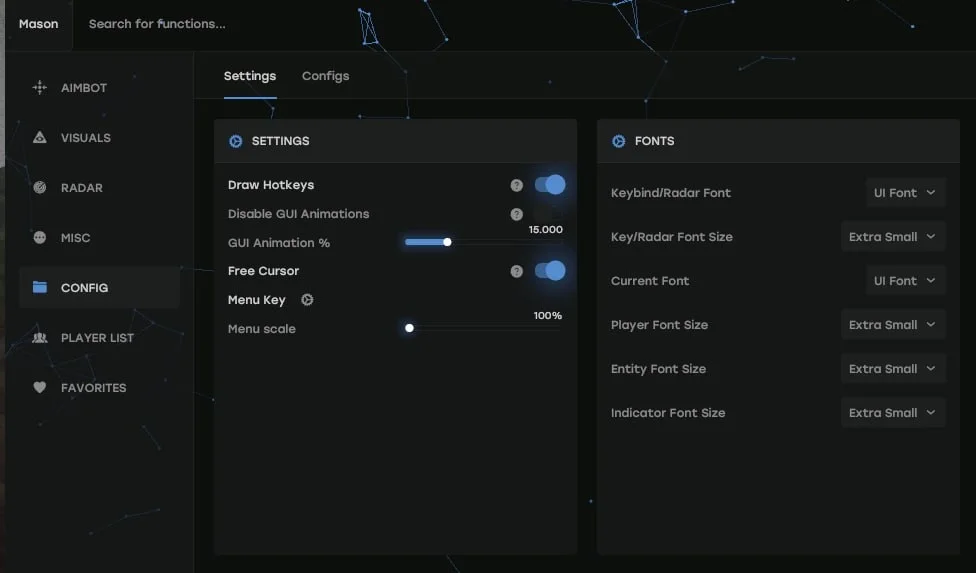
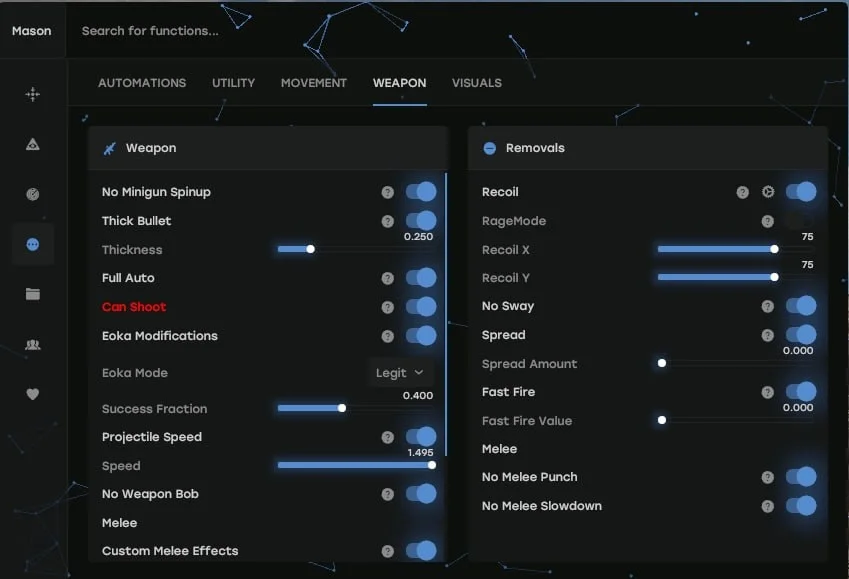
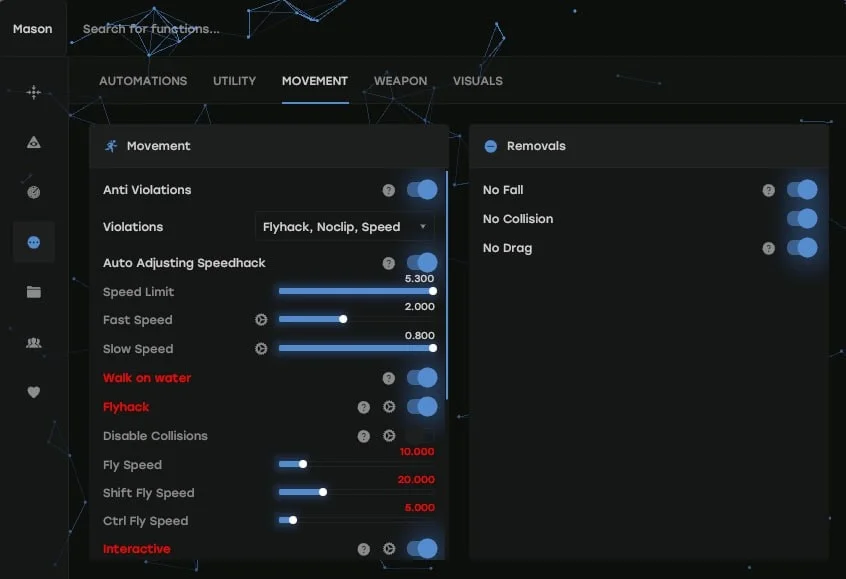
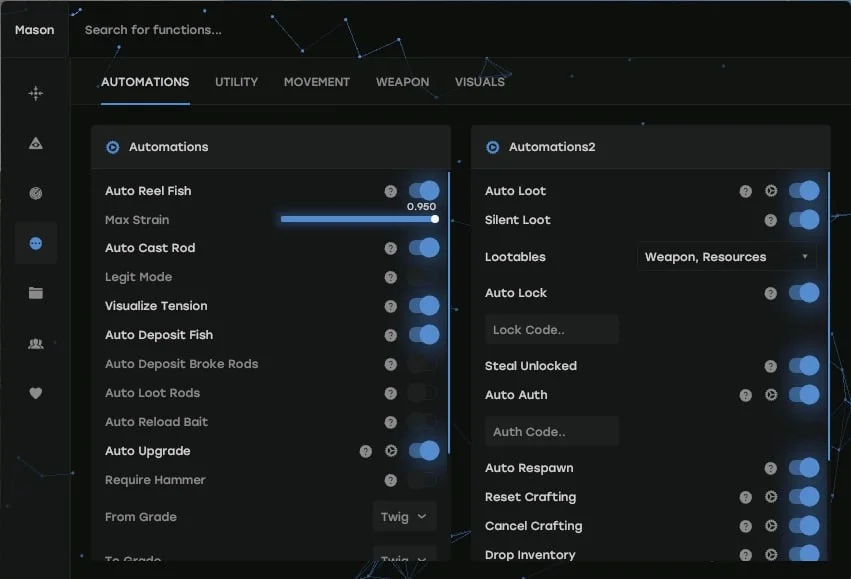
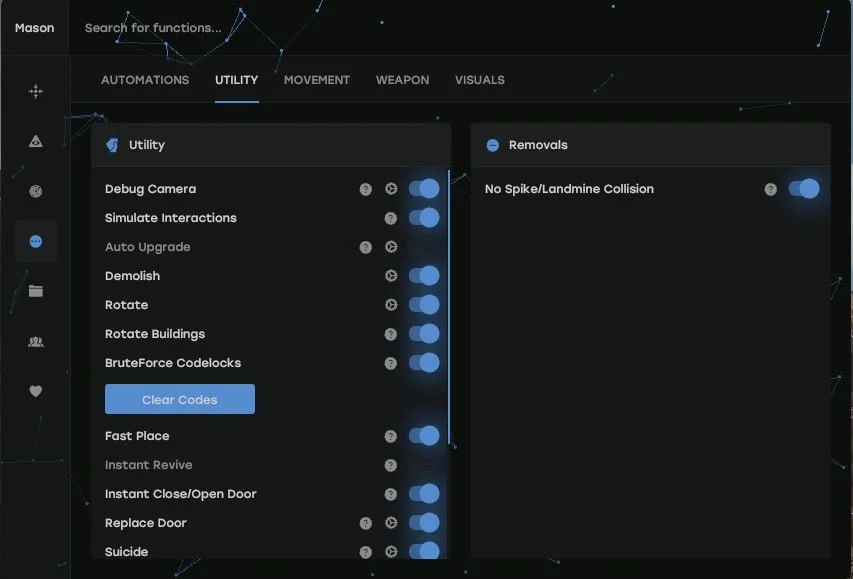
Aimbot: Snaps onto your target (custom hotkey)PSilent: Curves projectiles towards the target (custom hotkey)High Grenade Prediction: Forces prediction to find a valid point from a higher angleTarget Saved Position: Targets your current saved position on the mapUse Smoothing: Humanizes the aimbotUse Vischeck: Only targets visible playersAutoFire: Automatically shoots when the target is hittableHit Chance: Makes some shots miss (only with PSilent, has slider for %)Keep Target: Keeps the target locked while holding the hotkey, even if out of FOVSmooth: Customizable smoothing valueAimbone: Choose from a range of bones to aim at (Head, Neck, Spine, Lower Spine, Pelvis, Hitscan Priority)Secondary Aim Features:Secondary Aimbone: Choose a secondary bone for aimingSecondary Priority: Set priority for the secondary aim bone (Head, Neck, Spine, Lower Spine, Pelvis)Custom Projectiles: Makes projectiles hit if near the target (larger on mounted players)Legit Bullet TP: Decreases projectile size to seem more legitBehind Wall Calculations: Automatically calculates where PSilent should target behind objectsHeli Magic: Expands the helicopter hitboxDesync On Keypress: Activates desync while pressing aim keyBone Override: Overrides hitbone to a selected boneHeli Rotor Override: Overrides hitbone to target the weakspots of the helicopterPierce Hitbone: Chooses hitbone for projectiles (Head, Chest, Hand, Foot, Rand, Rand Hithead)Hit Material: Select projectile material (Generic, Glass, Metal, Wood, Flesh, Dirt, Snow)Override Bone: Choose override bone (Head, Chest, Hand, Foot, Rand, Rand Hithead)Crosshair: Customizable crosshair with color optionsFOV: Field of View with color settingsSimulate Projectile: Draws where the projectile will landPredicted Marker: Draws where you need to aim to hit the targetTarget Snapline: Draws a snapline to the targetCrosshair Types: Choose from Cross, Thick Cross, or DotFov Value: Adjustable FOV size for aimbotRecoil:Recoil X: Adjust recoil in XRecoil Y: Adjust recoil in YNo Sway: Removes weapon swaySpread: Modifies projectile spreadSpread Amount: Adjust spread (0 for no spread, 100 for max spread)No Weapon Bob: Removes weapon bobNo Bolt Cycle: Shoot without bolt cycle in bolt action riflesUnlock Angles: Turn while mounted (via hotkey)No Melee Punch: Removes melee punch (similar to recoil)No Melee Slowdown: Removes melee slowdown when running and hittingFast Bow: Instant bow shot on left mouse button pressInstant Charge: Instantly charges compound bow (without max damage)No Movement Penalty: Walk/run while charging compound bowPlayers: Toggle player ESP with customizable color customizationScientist: Toggle NPC visibility with color customizationName: Display player namesDistance: Show distance to playersTeamID: Display Team IDsBox: Display corner box around playersView Direction: Draws the direction in which the player is lookingSkeleton: Show player skeleton with adjustable thicknessHeldItem: Show held item for playersHotbar Options: Toggle hotbar, clothing, parenting, use icons, and friendly/NPC/sleeper optionsTeam/Enemy: Toggle ESP for teammates and enemies with color customization and hotkeyWounded/Dead: Toggle ESP for wounded or dead playersSleeping: Toggle ESP for sleeping playersOnline Sleeper: Only draw a sleeping player if he is connected to the serverDead: Draw dead players that have not respawnedSafetone: Toggle ESP for safezone playersOutside: Draw an indicator that a player is outsideOOF: Draws indicators for players out of FOVViscolor: Customize visibility colorPlayer Chams: Enable player chams with various material options (Lightning, Fire, etc.)Disable Player Culling: Disables culling for playersCham Options: Customize chams for Friendly and NPC chamsCham Colors: Adjust cham colors when selecting specific materialsText Spacing: Adjust spacing for player textPlayer Distance: Set the distance at which players are drawnNPC Distance: Set the distance at which NPCs are drawnDisable ESP Map: Disables all ESP when map is openBattlemode: Disables every item ESP on keypressPoint Of Interest: Generates a marker on the map at your saved positionRaids: Enables ESP for raids from any distanceRaid Time: Adjusts the time for raid visualsSave Position: Enables ESP for your last saved positionSave House: Enables ESP for your saved houseClear House: Clears your saved house positionClear Position: Clears your saved positionPatrol Heli:Bradley:Drones:Cargo Ship:Minicopter:Scrap Heli:Rowboat:Submarine:Attack Helicopter:Tug Boat:Pedal Bikes:Motor Bikes:Vehicle Chams: Enables chams for vehiclesMaterial: Choose material type for vehicle chamsVehicle Distance: Adjusts draw distance for vehiclesRecycler:Cupboard:TC Options: Display options for the Cupboard (HealthBar, Upkeep, ShowID)Stashes Unhidden:Local Stashes: Saves the stash positionSleeping Bag:RF Receiver:RF Broadcaster:HBHF Sensor:Seismic Sensor:Large Battery:Workbench Tier 3 / 2:Deployable Chams: Enables chams for deployOre Chams: Enables chams for oresMaterial: Choose the material type for Ore chams (e.g., Lightning, LightGlow, Flame, etc.)Node Path: Draws a line to the closest ore enabled in ESPNode Distance: Adjusts the draw distance for oresHemp:Stone:Metal:Sulfur:Wood:Diesel:Berry Selection: Select from various berries (BlackBerry, BlueBerry, etc.) to enable ESPCollectible Distance: Adjusts the draw distance for collectiblesCorn:Mushroom:Pumpkin:Potato:Food Chams: Enables chams for food itemsMaterial: Choose the material type for Food chams (e.g., Lightning, LightGlow, Flame, etc.)Food Distance: Adjusts the draw distance for food itemsBear:Boar:Stag:Wolf:Horse:Shark:Animal Chams: Enables chams for animalsMaterial: Choose the material type for Animal chams (e.g., Lightning, LightGlow, Flame, etc.)Animal Health: Select the display type for animal health (HealthBar, HealthText)Airdrop:Locked Crate:Normal Crate:Military Crate:Elite Crate:Tool Crate:Advanced Water Crate:Basic Water Crate:Medical Crate:Food Crate:Basic Crate:Normal Barrel:Oil Barrel:Container Chams: Enables chams for containersMaterial: Choose the material type for Container chams (e.g., Lightning, LightGlow, Flame, etc.)Player Corpse:Scientist Corpse:Animal Corpse:Backpack:Dropped Items:Distance: Adjusts the draw distance for dropped itemsItem Category: Choose categories for dropped items (Weapon, Construction, Items, Resources, etc.)Dropped Weapons:Distance: Adjusts the draw distance for dropped weaponsOther Chams: Enables chams for other entitiesMaterial: Choose the material type for Other chams (e.g., Lightning, LightGlow, Flame, etc.)EnableRadar: Enables radarDraw Scientist: Draws scientists on radarDraw Other Entities: Draws other entities on radarDraw Cross: Draws cross on radarAdjustable color settings for radar crossDraw Background: Draw radar backgroundAdjustable color settings for radar backgroundDraw Circles: Draw radar range circlesAdjustable color settings for radar circlesDraw Text: Draw text on radarDraw Direction: Displays the direction on the radarIngame Map Players: Displays players on in-game mapIngame Map Scientist: Displays scientists on in-game mapShow Ingame Radar Text: Displays radar textShow Ingame Radar Direction: Displays radar directionIngame Map LocalStashes: Displays local stashes on in-game mapIngame Map Raids: Displays raids on in-game mapRadar Size: Adjusts radar sizePlayers Length: Adjusts player marker lengthNPC Length: Adjusts NPC marker lengthPlayer Thickness: Adjusts player marker thicknessNPC Thickness: Adjusts NPC marker thicknessPlayer Circle Size: Adjusts circle size for playersNPC Circle Size: Adjusts circle size for NPCEntity Circle Size: Adjusts circle size for entitiesMap Circle Size: Adjusts size of circles on the mapEntity Map Circle Size: Adjusts size of entity circlesDebug Camera: Frees camera position (custom hotkey)Instant Loot: Instantly loots items from boxesInstant Pickup: Instantly picks up items (e.g., doors, boxes)Replace Door: Replaces current door with one in your handFast Place: Decreases placement time for high wallsInstant Revive: Instantly revives playersRevive Options: Everyone or Friends OnlySuicide: Breaks legs to suicide (custom hotkey)Open Crates: Opens unopened cratesNo Spike/Landmine Collision: Walk on traps without damageAnti Violations: Prevents generating violationsViolation Options: Flyhack, Noclip, Speed, etc.Bar Type: Pulsating, Normal, Segmented, CircleAnti AFK: Prevents AFK kickFlyhack: Fly with WASD key (adjustable speed)Disable Collisions: Clip through objectsInteractive Noclip: Move anywhere with noclip (adjustable speed)Teleport: Teleports 5 meters up/downOmni Sprint: Sprint in any directionOn Ladder: Shows when on ladderDick Mode: Puts you into ground on others’ screens (invisible)Walk on Water: Lets you walk on waterInfinite Jump: Jump anytimeSpinbot: Automatically spins you (adjustable speed)No Fall: No fall damageNo Collision: Walk through playersNo Drag: Walk through spikes/fire without slowdownNo Minigun Spinup: Shoot minigun instantlyWeapon Spammer: Plays shooting animation (hotkey)Spam Speed: Adjusts spam speedEoka Modifications: Modifies Eoka hitchanceEoka Mode: Legit, Rage, or NeverHitSuccess Fraction: Adjusts success rateProjectile Speed: Changes projectile speedSpeed: Adjusts speed valueFull Auto: Makes gun fully automaticCan Shoot: Shoot while swimming, climbing, etc.Aim in Mountable: Aiming in mounted vehiclesCustom Melee Effects: Changes hit effects for meleeEffect Type: Glass, Water, Tree, Flesh, Metal, DirtMelee Players: Automatically hits playersMelee Bone: Head, Chest, Hand, Foot, Rand, Rand NoHeadMelee Trees: Automatically hits treesMelee Ores: Automatically hits oresMelee Helicopter: Hits helicopter with extended rangeAuto Strike: Automatically strikes when near targetSilent Mode: Silent melee mode (use at own risk)Auto Upgrade: Automatically upgrades the building you are looking atFrom Grade: Chooses the starting upgrade tierTo Grade: Chooses the destination upgrade tierAuto Reel Fish: Automatically reels the fish in for youAuto Cast Rod: Automatically casts the rodLegit Mode: Allows slower, more legitimate fishingVisualize Tension: Displays the tension of the fishing lineAuto Deposit Fish: Automatically deposits fish into selected boxesAuto Deposit Broke Rods: Automatically deposits broken rodsAuto Loot Rods: Automatically loots a rod from the boxAuto Reload Bait: Automatically reloads bait in the rodAuto Heal: Automatically heals when health is lowAuto Drink: Automatically drinks water when thirstySpam Torch: Toggles torch on/off instantlyAuto Collect: Automatically collects entitiesAuto Eat: Automatically eats collectiblesCollect Options: Allows selection of collectible items (Hemp, Stone, Metal, etc.)Auto Reply: Automatically responds to chat messages (requires API)Stack Items: Automatically crafts items from dropdown selectionStack Options: Selects items to stack (Metal, Wood, Stone)Auto Loot: Automatically loots containers based on selected itemsSilent Loot: Loots containers silentlyLootables: Items that can be looted (Weapons, Resources, Ammo)Auto Lock: Automatically locks nearby code locksSteal Unlocked: Steals code by changing it when other player unlocksAuto Auth: Automatically authorizes on nearby cupboardsCancel Crafting: Cancels active crafting timersReset Crafting: Resets crafting timersDrop Inventory: Drops all inventory when hotkey pressedDrop Container: Drops items from the container you are lootingRefill Jackhammer: Refills jackhammer when near workbenchKeep In Handcuffs: Keeps players in handcuffsSteal Players: Mounts nearby players to your vehicleInstant Handcuff Release: Instantly uncuffs playerSpam Handcuffs: Emits sound when player in handcuffsLoad Config: Choose config to load from listRage Config:Legit Config:SemiRage Config:Extra Config:Extra Config 1 / 2 / 3:LOAD Button: Load selected configSAVE Button: Save selected configConfiguration Status: Displays current configurationFont Settings:Current Font: Choose between fontsPlayer Font Size: Select font size for playersEntity Font Size: Select font size for entitiesWarnings Font Size: Select font size for warningsMenu Key: Bind the hotkey for menuMenu Scale: Adjust menu scale (100–150%)Displays favorited functionsSliders:Dropdowns:Full Panels:Full Sub Panels:Toggles:
СИСТЕМНЫЕ ТРЕБОВАНИЯ
Нужна флешка для запуска:
Да
Дополнительные требования к Windows:
Включить VT-x / VT-d (виртуализация), включить Hyper-V, отключить Secure Boot
Требуемый формат системного диска:
Только GPT (MBR не поддерживается)
Встроенный спуфер:
Нет
Античит:
EAC
Обход записи в OBS:
Да
Поддерживаемые режимы игры:
Оконный, безрамочный
Поддерживаемые процессоры:
Intel / AMD
Поддерживаемые системы:
Windows 10 (2004 / 20H2 / 21H1 / 21H2 / 22H2), Windows 11 (все версии, включая 25H2)
Да
Дополнительные требования к Windows:
Включить VT-x / VT-d (виртуализация), включить Hyper-V, отключить Secure Boot
Требуемый формат системного диска:
Только GPT (MBR не поддерживается)
Встроенный спуфер:
Нет
Античит:
EAC
Обход записи в OBS:
Да
Поддерживаемые режимы игры:
Оконный, безрамочный
Поддерживаемые процессоры:
Intel / AMD
Поддерживаемые системы:
Windows 10 (2004 / 20H2 / 21H1 / 21H2 / 22H2), Windows 11 (все версии, включая 25H2)